
Ergonomics looks at how well a work environment fits the person using it, with the goal of making tasks safer, more comfortable and more efficient. Many jobs involve long stretches of sitting, repeated hand and wrist motions, or physically demanding tasks, and over time these can lead to aches and stiffness. A poorly arranged workstation may contribute to weakened postural muscles, slouched sitting or standing, tight and sore muscles in the neck, shoulders and back, discomfort in the hands, wrists or arms, and a higher chance of injury. How well a workspace supports health depends on a mix of personal risk factors, the work environment itself and the tools being used. Because these factors differ from person to person, the best setup for one worker may not suit another.
People who sit, drive or stand for much of the day can often make a few simple adjustments that help them stay active and comfortable.
Working at a Desk, Computer, Tablet or Phone
Short, regular movement breaks are a good starting point. Roughly every hour, spending a couple of minutes gently turning the head left and right, nodding up and down, tipping each ear toward the shoulder, and bending the lower back and hips forward, backward and to each side may help keep muscles and joints from stiffening.

An ergonomic setup is one that lets a person reach and use everything around them safely and without strain. Helpful points to consider include:
- Rest both feet flat on the floor, with the knees and ankles bent at about right angles. When the feet dangle or lack support, posture tends to slip.
- Evaluate the chair. It should support the back and the arms, with armrests set so the forearms and elbows rest comfortably at roughly 90 degrees. If the chair leads to hunching or leaves the lower back unsupported, a lumbar cushion may help. Ready-made cushions are sold widely, but a simple version can be made at home: fold a small bath towel in half the long way, roll it up from one short end to the other, and wrap rubber bands around each end. Placed in the curve of the lower back, the roll should feel supportive without pushing the body forward too much.
- Keep frequently used items within easy reach. Stretching too far forward can strain the neck, shoulders and mid-back, while leaning too far back can load the neck, shoulders and chest.
- Position the monitor so the eyes line up with its upper third. Connecting a laptop to a larger external screen can make this easier, and a standing desk may help discourage slumping over the keyboard.
- Place the screen straight ahead at about arm's length so it can be viewed head-on rather than at an angle. A screen set off to one side can add stress along the spine and may contribute to muscle tension and, in some cases, headaches. With two monitors, set them edge to edge and center the nose between them.
- When using a tablet or phone, hold it out in front and raise it high enough that the head does not need to tilt up or down. Resting the elbows on a firm surface can help support the arms.
- Wrist rests may make desk work more comfortable. They are meant to keep the wrists level with the floor and the forearms straight, which may lower the risk of repetitive strain problems such as carpal tunnel syndrome. Try to avoid bending the wrists back or angling them outward, and aim for a neutral position. If the current keyboard or mouse makes that hard, an ergonomic keyboard and mouse may be worth considering.
Driving and Riding in a Car
Car seat adjustments can noticeably affect comfort, whether on a daily commute or a long trip. A backrest tilted back about 30 degrees, which looks roughly like the one o'clock position when viewed from the side, is a common recommendation. The lumbar support should be adjusted so the lower back feels supported. Many car seats lack built-in lumbar support, which may add to discomfort; in that case, a lumbar cushion or the rolled towel described above can help.
For knee, leg or foot discomfort while driving, sliding the seat forward or back can keep the driver from overreaching or bending the knees and ankles too sharply to work the pedals. The headrest also matters: its top should sit about level with the top of the ears and as close to the back of the head as possible, which may help protect the neck in a collision. On long drives, stopping every few hours to stretch is a good habit. A short walk around the car and a few gentle back and neck movements may help ease stiffness before getting back on the road.
Standing at Work
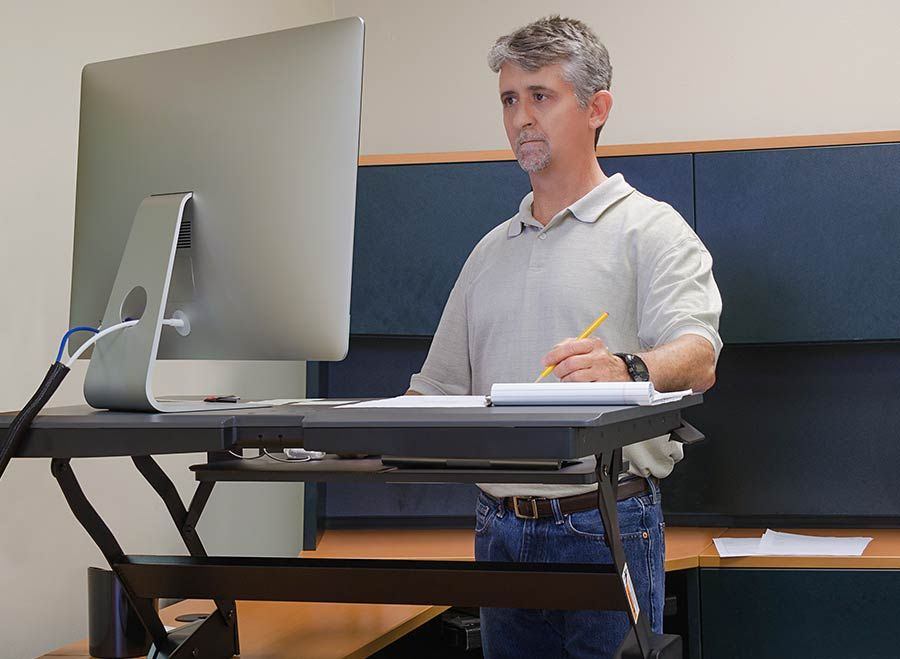
Standing desks can be a helpful option, but using one incorrectly may cause as many problems as sitting all day. People switching from full-time sitting should ease into standing gradually. One approach is to begin with about 10 minutes of standing each hour and sit the rest of the time, then slowly add standing time as the body adjusts.
Many seated-workstation principles carry over to standing: keep the work directly in front to avoid repeatedly twisting or leaning to one side. A cushioned surface, such as an anti-fatigue mat or supportive, comfortable footwear, may ease pressure on the leg joints and muscles. Standing still for long periods can reduce circulation to the muscles that hold the body upright, so a brief two-minute walk each hour may help keep blood moving to the legs and feet. Shifting weight between the feet from time to time, or resting one foot on a low footrest, may also help reduce fatigue.
Small, low-cost changes to posture and workstation setup may help ease tension and physical strain and reduce discomfort. A chiropractor or other healthcare provider can suggest adjustments suited to an individual's specific needs.